
Notes
5 Ways a Google Business Profile Suspended Status Can Happen and What Each One Requires
A Google Business Profile suspended status is not a warning. There is no grace period, no email countdown, no chance to fix things before the damage lands.
Reviewed by Melike Erguven, Co-founder of LocalLeadSignal · September 25, 2026 · 14 min read
A Google Business Profile suspended status is not a warning. There is no grace period, no email countdown, no chance to fix things before the damage lands. One day the listing is visible, calls are coming in, and customers can find directions. The next day the profile is gone from search and maps, the phone has gone quiet, and there is no clear explanation anywhere in the inbox. For a business that depends on local search for a meaningful share of its revenue, this is urgent.
This guide walks through the full sequence: understanding what kind of suspension you are dealing with, fixing the underlying problems before filing anything, submitting a reinstatement appeal correctly, and doing the post-recovery work that keeps the profile from landing in the same place six months later. Read through the whole thing before you touch the appeal form. The order of operations matters more than speed, and skipping a step is the most common reason a reinstatement takes months instead of weeks.
What actually happened: understanding why a Google Business Profile gets suspended
Not all google business profile suspended cases look the same, and the distinction matters because the fix for one type does not apply to the other.
A soft suspension means the profile still appears in search results and maps, but the owner has lost the ability to manage it. Customers can still find the business, but you cannot edit hours, respond to reviews, or post updates. A soft suspension often signals a verification problem or a policy flag that has not yet escalated.
A hard suspension is different. The profile disappears entirely from Google Search and Google Maps. There is no listing, no reviews showing, no address or phone number visible. For most small businesses, this is the scenario that stops the phone from ringing.
Common triggers for a GBP suspension include:
- NAP inconsistencies: The business name, address, or phone number on the profile does not match what appears on major directories or on the business's own website. Google cross-references these signals.
- Keyword stuffing in the business name: Adding words like "best," "affordable," or a service category to the legal business name is a direct violation of Google's guidelines for representing your business on Google.
- Address problems: Using a virtual office, a UPS Store mailbox, or a shared coworking space without physical signage can trigger a flag. So can listing a PO box as the business address.
- Sudden category changes: Switching the primary category to something unrelated to the actual business, or adding several categories at once, can look like manipulation to Google's automated systems.
- Review spikes: A large number of reviews arriving in a short window, particularly after a suspension or a dormant period, can re-trigger flags.
- Unauthorized edits: A third-party editor or a previous agency may have made changes the owner never approved.
Google almost never tells you which specific rule was violated. The suspension notice, if there is one, is usually vague. That means the first job is always to audit, not to guess. Before anything is changed or submitted, you need a clean baseline: a complete record of what Google had on the profile, exactly as it existed at the moment of suspension. That record becomes the foundation for every decision that follows.

The first thing to do before you file anything
Slow down. Filing an appeal before the underlying problem is corrected almost always results in a second rejection, and each rejection resets the review clock.
Pull a full record of the profile as it existed. If you still have access (soft suspension), document every field:
- Business name: Exact spelling, including any capitalization or punctuation
- Address: Full street address as it appears, including suite or unit number
- Phone number: Which number is listed, and whether it matches the number on the website and major directories
- Website URL: Exactly as entered, including any tracking parameters someone may have added
- Primary and secondary categories: Every category currently selected
- Recent edits: The edit history, if accessible, showing what changed and when
If you have been locked out (hard suspension and no dashboard access), check Google's cached search results, screenshots from before the suspension, or any agency reports that captured the profile's state.
Cross-check that information against three things: the actual legal business registration, any physical signage at the location, and the listings on major directories. Inconsistencies that are visible to you now are also visible to Google during the appeal review. Fix them first.
Check whether any third-party editor had access. Agencies, marketing vendors, or former employees sometimes have manager or owner access to a profile. If someone made a change the business owner did not approve, that change may be the trigger. Go into the profile's user management settings and revoke any access that should not be there before filing.
Then try to identify a specific precipitating action. Did the suspension follow a business name edit? A switch to a PO box address? A bulk edit that went through all at once? Narrowing the cause narrows the fix, which makes the appeal cleaner and more persuasive. If nothing specific changed recently, the audit of citations and NAP consistency will usually surface the problem.
One more thing worth checking: local citations across major directories. If the profile address says Suite 200 and twenty directory listings say Suite 2, or if the phone number on the profile is one digit off from what half the directories carry, that inconsistency is a signal problem that predates the suspension and needs to be resolved before Google reviews the appeal.
Fixing the profile before Google sees it again
Corrections need to happen in a specific order. Do not submit an appeal with a profile that still contains the element that triggered the suspension.
Start with the business name. Remove any keywords, descriptors, or location words that are not part of the actual legal or commonly known business name. A law firm is not "Chicago Personal Injury Lawyers Smith & Associates." It is "Smith & Associates." Match the name exactly to what appears on the business license or the physical sign on the door.
Next, confirm the address meets Google's eligibility rules for the business type. This is where the distinction between a storefront business and a service area business matters.
A storefront business has a physical location that customers visit. The address needs to be a real, staffed, publicly accessible location with signage. A service area business (a plumber, a cleaning service, a mobile notary) serves customers at the customer's location. For service area businesses, the address can be hidden on the profile, and Google's eligibility guidelines specifically ask which type the business is during the appeal process. Listing a home address as a customer-facing storefront address when it is not one creates the kind of ambiguity that gets profiles flagged.
Revert any experimental category changes. The primary category should reflect the single most accurate description of what the business does. Secondary categories can add relevant context, but the primary category is what Google weights most heavily for map pack ranking.
After the profile fields are corrected, look at the business website. Google cross-references the site during appeal review, and the local business schema markup on the site needs to match the corrected profile exactly. Schema markup is structured data embedded in the website's code that tells search engines the business name, address, phone number, and hours in a format that machines can read directly. If the schema says one address and the profile says another, that is a contradiction that undermines the appeal. If there is no schema markup on the site at all, adding it before the appeal strengthens the consistency of the signals Google will check.
Then address citation cleanup. If the profile address differs from what appears on twenty directories, fix the directories first. Major aggregators feed data into hundreds of smaller directories, so correcting the source aggregators carries the most leverage. This step takes time, which is one reason rushing to file an appeal immediately after a suspension so often fails. The environment of signals needs to be clean before Google reviews the case.
Documents Google commonly requests during a reinstatement review include:
- A utility bill showing the business name and service address
- A business license issued by the relevant authority
- A photo of the storefront with the address visibly posted
- A signed commercial lease showing the business name and address
Have these ready before submitting. If the business is a service area business operating from a home address, the documentation situation is different: in that case, the goal is to confirm that the business is legitimately operating, even if the address is hidden on the profile.
Submitting the reinstatement appeal and what Google does with it
Once the profile, website schema, and local citations reflect the corrected, consistent information, the appeal can be filed.
Google offers two paths. The in-dashboard appeal is available for some suspensions when the owner can still log in and see the profile in the Business Profile manager, even if the listing is not showing publicly. If that path is available, it will appear as an option inside the dashboard. The Business Redressal Complaint Form is the route used when dashboard access is lost or when the in-dashboard option is not visible. Both paths ask for the same essential information: business name, address, contact information, and an explanation of the situation.
What to write in the appeal: keep it factual and plain. Describe the business, what it does, who it serves, and where it operates. Explain how it meets Google's eligibility guidelines for its business type. List the specific corrections that were made before submission. Do not use emotional language, do not accuse Google of making an error, and do not describe how much revenue was lost during the suspension. The reviewer is checking whether the profile meets the policy requirements, not adjudicating a grievance.
A clear appeal looks like this in practice:
- Business description: One or two plain sentences describing what the business does
- Eligibility statement: A brief explanation of why the business qualifies (physical storefront with customer visits, or service area business serving a defined geography)
- Corrections made: A specific list of what was changed and why, referencing the guideline that applied
- Documentation attached: A note of what supporting documents are included
Typical review timelines run three to five business days for straightforward cases. Appeals involving flagged addresses, policy ambiguity, or businesses in categories that Google reviews more carefully (legal services, healthcare, financial services) can run two to four weeks.
A rejection response usually restates the policy and indicates the profile does not meet eligibility requirements. An approval comes with the profile becoming visible and manageable again. The absence of any response after two weeks is worth following up on through the same form, but do not submit duplicate appeals while the first one is still open. Google's review systems treat duplicates as noise, and stacking them can slow the queue rather than speed it up.
After approval: the work that keeps the profile from being suspended again
Reinstatement is not the finish line.
Run a post-approval audit immediately. Verify every field in the profile against the corrections made before the appeal: business name spelling, address format, phone number, website URL, hours, primary category, secondary categories. Confirm that the website schema still matches. Check that the citation cleanup carried through to the major aggregators and is beginning to propagate to downstream directories.
Then set up ongoing monitoring. Profiles are editable by the public. Users can suggest changes to hours, addresses, categories, and business names, and Google sometimes applies those suggestions automatically without notifying the owner. A business that checks its profile once a quarter can find that its primary category quietly changed two months ago. A weekly check of the profile's current state is not overkill; it is basic maintenance.
Review volume connects to profile health in a specific way. A steady, authentic flow of new reviews signals to Google that the business is active and trusted. Responding to reviews promptly reinforces that signal. Google's own guidance on managing customer reviews recommends engaging with reviews, and the reason matters: review signals feed into local ranking, not just reputation. What to be cautious about is a sudden spike. A flood of new reviews arriving right after reinstatement can look like manipulation to the same automated systems that flagged the profile initially. Organic, consistent review growth is the goal.
After reinstatement, confirm the profile is actually ranking in the local map pack for core service terms, not just that it appears when someone searches the exact business name. Branded searches find the profile even when rankings are weak. The real test is whether the business shows up when someone searches the service category in the area without typing the business name. If it does not, that is a ranking signal issue, and the post-reinstatement work shifts toward google business profile optimization: completing every profile field, adding photos, posting regularly, and building the citation and review signals that feed map pack visibility.
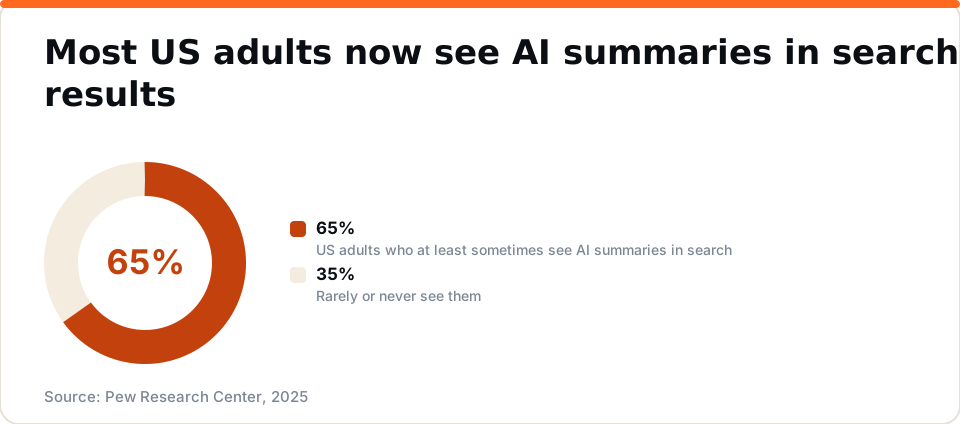
AI search visibility operates on a separate track from your Google Business Profile. Getting reinstated restores your presence in Google's own results, but AI assistants that field local queries pull from a wider pool of signals: third-party citations, review sentiment across platforms, and indexed content spread across the web. We have seen this play out with our own experiment. Over the summer of 2026, more AI assistants named LocalLeadSignal when asked about us by name, yet for broader buyer questions about local SEO tools, established brands still held the recommendations. Map pack recovery and AI visibility do not land at the same time, and treating them as a single milestone sets up a gap in expectations.
Source: Pew Research Center, 2025
What the profile looks like once it is fully recovered, and how long that takes
Realistic expectations matter here. A reinstated profile does not automatically return to its previous position in the map pack the day it goes live.
Technical recovery and competitive recovery happen on different timelines. Technical recovery means the profile is live, verified, and manageable. That can happen within hours of an approval. Competitive recovery means the profile earns back the map pack position it held before the suspension, and that depends on how long the profile was dark, how consistent the underlying signals are, and how strong the competition is in the local market.
A profile that was suspended for a few weeks, reinstated with clean signals, and supported by consistent citations and steady review activity can regain map pack visibility within two to six weeks. A profile that was suspended for several months may start from a significantly weaker ranking position than it held before, because other businesses in the area continued building signals while this one was invisible.
AI assistants catching up is slower still. Tools like ChatGPT, Perplexity, and Gemini build their local recommendations from indexed content and third-party sources that refresh on their own schedules. A business that was invisible for months may not appear in AI-generated local recommendations for some time after reinstatement, regardless of where the Google profile stands. That is not a flaw in the reinstatement; it is the nature of how those systems index and update.
A fully recovered profile has a specific, recognizable profile:
- Consistent NAP across the business's own website, the Google profile, and all major directories
- Active review volume with recent reviews and owner responses
- Accurate, complete profile fields: hours, categories, photos, services, and a description that reflects what the business actually does
- Local business schema markup on the website that matches the profile exactly
- A position in the local map pack for primary service terms, not just branded searches
- Regular profile activity: posts, updated photos, prompt review responses
The difference between a profile that holds that position and one that drifts back into vulnerability over the next year is ongoing attention. The SBA's resources for small businesses are useful for understanding the broader context of how small businesses sustain themselves, and the pattern applies here too: the businesses that treat local visibility as a habit rather than a one-time fix are the ones that stay visible. Profile maintenance is not a project with an end date. It is an operational function, the same as checking inventory or returning calls.
Google's own guidance on tips to improve your local ranking outlines the factors that influence where a profile appears: relevance, distance, and prominence. Prominence, in particular, depends on accumulated signals over time, which is why a reinstated profile that once ranked well may need months to rebuild what was lost during the suspension period.
A suspended Google Business Profile is fixable. But the sequence matters enormously. Fix the underlying signals, then file the appeal. Not the other way around.
The businesses that spend months going back and forth with Google on reinstatement almost always share the same pattern: they filed quickly, got rejected, filed again, and only started auditing the actual problems after the second or third rejection. By then the profile had been dark long enough to lose its ranking position even before the appeal was approved.
Before you file a reinstatement appeal, find out what Google and your directories actually show for your business. Run a free local SEO audit and start the fix from a clear picture of where things stand. What you believe is on the profile and what is actually there are often two different things, and that gap is exactly what a reviewer will find if you do not find it first.
Frequently asked questions
- How do I know if my Google Business Profile is suspended or just temporarily unavailable?
- Log in to your Google Business Profile dashboard. A suspended profile shows a warning message inside the dashboard and is no longer visible on Maps or in Search. A temporary outage does not produce that warning. If you see the suspended badge, you need to submit a reinstatement request rather than waiting for the listing to reappear.
- What is the difference between a soft suspension and a hard suspension on Google Business Profile?
- A soft suspension hides your profile from Maps and Search but leaves your account accessible so you can edit the listing and submit a reinstatement request. A hard suspension removes the profile entirely and is typically issued for more serious or repeated policy violations. Hard suspensions are harder to reverse and require stronger documentation in the appeal.
- Can a competitor get my Google Business Profile suspended?
- Yes. A competitor can flag your profile as spam or report it for a policy violation. Google reviews those flags, and if its systems agree with the report, the listing may be suspended. Keeping your profile fully compliant with Google's guidelines is the best protection, because a compliant listing is far less likely to be actioned even when flagged.
- How long does Google Business Profile reinstatement take?
- Google does not publish a fixed timeline. Most reinstatement reviews take several business days to a few weeks. Submitting multiple requests before the first is resolved can slow the process. Submitting accurate documentation with the first request, after fixing the underlying policy issue, gives you the best chance of a faster and successful outcome.
- Does a suspended Google Business Profile affect AI search recommendations?
- Yes. AI assistants that recommend local businesses draw on a data layer that includes your Google Business Profile, local citations, and structured data on your website. A suspended profile weakens that data layer, which can reduce how often AI tools surface your business in response to local buyer questions, not just how you appear on Google Maps.
See where your own business stands.
We measure your local rankings, your listings, your website, and how AI assistants answer for your business. No signup required.
Or jump straight to pricing →