
Google Business Profile
Google Business Profile Optimization Checklist: 27 Settings That Move the Map Pack
Search for what you do plus the town you do it in. Google answers with a map, three businesses, and a column of links most people never reach.
Reviewed by Melike Erguven · June 12, 2026 · 10 min read
Search for what you do plus the town you do it in. Google answers with a map, three businesses, and a column of links most people never reach. Those three positions are the map pack, and the biggest input you control for earning one of them is the state of your profile. That is why Google Business Profile optimization is the highest return work in local SEO: the profile feeds the map pack directly, every setting is free, and most of your competitors have not touched theirs since the day they verified it.
This checklist covers 27 settings in five groups, in the order we recommend working through them: identity, services, photos, reviews, and the ongoing signals that keep a profile visible once it gets there. Plan an afternoon for the first pass. If you would rather see which settings you are missing before you open a single menu, audit your GBP for free and get a graded snapshot of your profile in under a minute.
Why Google Business Profile optimization moves the map pack
Google explains local ranking in three words: relevance, distance, and prominence. Its own documentation on how to improve your local ranking says so plainly. You cannot move your building, so distance is fixed. The other two are profile work. Relevance is whether Google understands what you sell, which comes mostly from your categories, services, and description. Prominence is whether Google believes people choose you, which comes mostly from reviews, activity, and how searchers behave when your listing appears.
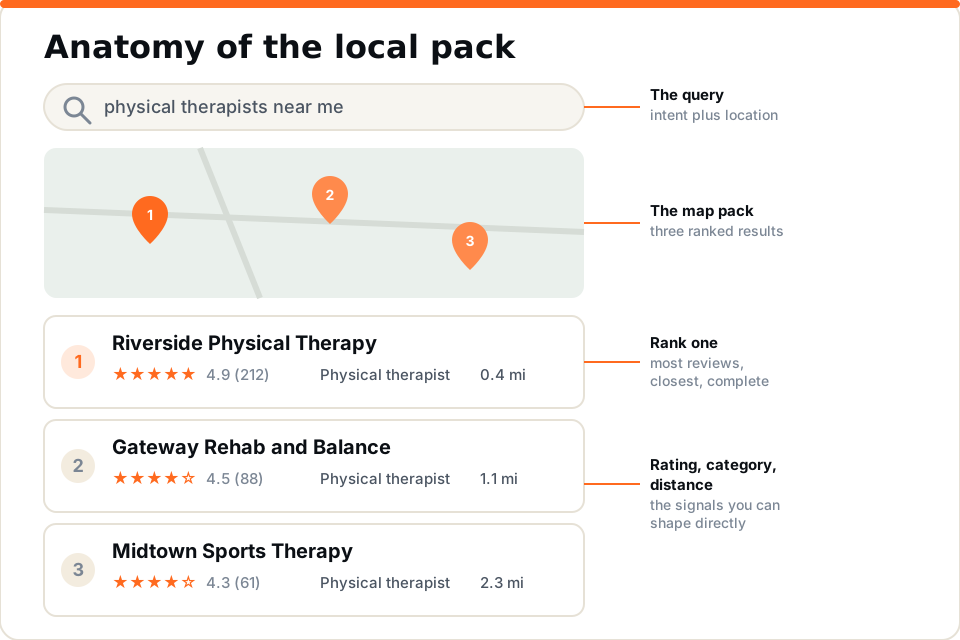
Look at any map pack result and notice what a searcher actually sees: a name, a star rating, a review count, a category, a distance. Every one of those elements except distance traces back to a setting below. Profile signals are the largest controllable group of local ranking factors, ahead of citations and on-page content. Our complete local SEO guide for 2026 covers how the profile fits into the full stack; this post goes deep on the profile layer alone.
How to work the checklist
Most Google Business Profile optimization advice arrives as a flat list of eighty items, which is why nobody finishes it. This checklist splits the 27 settings into five groups, and the order matters. The first two groups decide whether you can rank at all, because they define what Google thinks you are. The photo and review groups decide whether you do rank and whether the searcher picks you. The last group keeps the profile from quietly decaying after you stop paying attention.
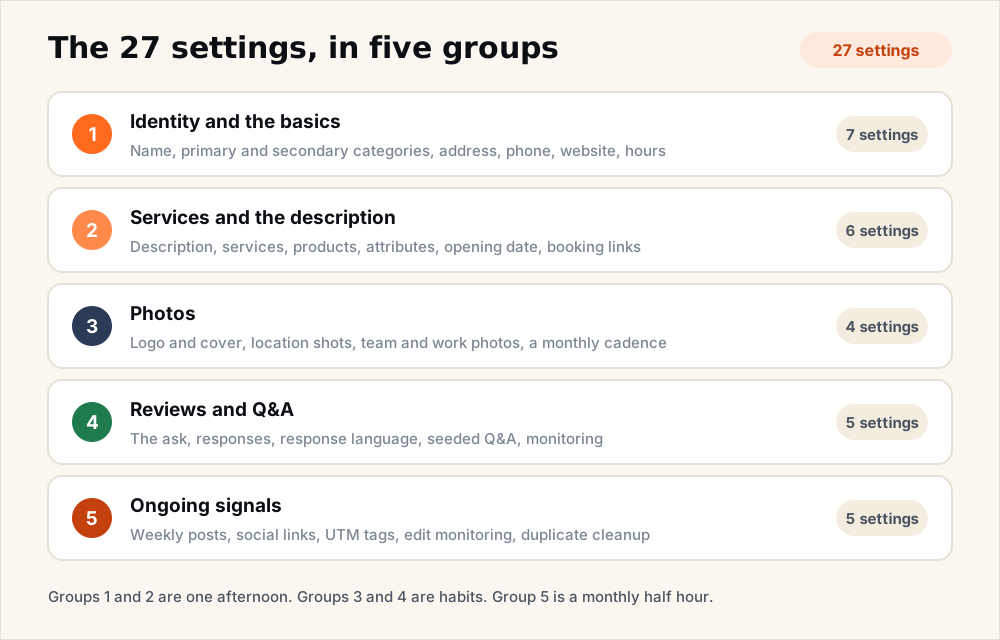
- Groups one and two are a single afternoon. Everything in them is a form field. Fill them once, correctly, and revisit quarterly.
- Groups three and four are habits, not tasks. Photos and reviews compound. A profile that gains a little every week beats a profile that got a lot once.
- Group five is a monthly half hour. It exists because Google keeps editing profiles after you stop looking, and because measurement is what tells you the rest is working.
Identity settings that anchor relevance
These seven settings tell Google what you are and where you are. Get any of them wrong and everything downstream underperforms.
- Setting 1: your business name, exactly as the sign reads. Use your real-world name and nothing else. Adding keywords or your city to the name field violates Google's guidelines for representing your business and can get a profile suspended. The ranking boost from a stuffed name is real, which is exactly why Google polices it.
- Setting 2: the primary category. The most powerful single field on the profile. Choose the most specific category that matches what you most want to rank for, not the broadest one that technically applies. A clinic that picks Physical Therapy Clinic over Medical Clinic just told Google which map packs it belongs in.
- Setting 3: secondary categories. Add every additional category that genuinely describes a service you offer, up to the limit of nine. Each one unlocks a family of queries. Skip aspirational categories for things you barely do; they dilute relevance and invite reviews you cannot satisfy.
- Setting 4: address or service area. A storefront business shows its exact address, with the suite number written the same way everywhere on the web. A service area business hides the address and defines an honest service area. Do not claim a fifty mile radius you will not drive; Google cross-checks where your customers actually are.
- Setting 5: a local phone number. Use a local number as your primary, and make it identical on your website, your directories, and every listing you control. Name, address, and phone consistency is one of the oldest trust signals in local search and it still matters.
- Setting 6: the website link, pointed at the right page. For most businesses the homepage is correct. If your profile is built around one core service, link the page that matches it. The destination should confirm everything the profile claims.
- Setting 7: hours, including holiday hours. Wrong hours are a conversion killer and a trust signal in one. A searcher who drives to a closed business leaves a one star review, and Google demotes listings it suspects of stale hours. Set holiday hours at the start of every season.
Services, attributes, and the description
These six settings turn a verified listing into a document Google can match against real queries.
- Setting 8: the business description. You get 750 characters. Spend the first sentence saying what you do and where, in plain language. Work your primary service in naturally, skip promotional language, and do not paste a slogan. This field supports relevance and gives the searcher a reason to believe.
- Setting 9: every service, individually listed. Add each service as its own entry and fill in the description field for each one. A profile that lists eleven specific services gives Google eleven chances to match a query. Most profiles list three and stop.
- Setting 10: products, if you sell them. Product entries get visual placement on the profile. Retail, med spas, and clinics with packages should treat this as free shelf space.
- Setting 11: attributes. Wheelchair accessibility, parking, amenities, identity attributes, payment options. Individually small, together they answer the quiet objections that stop a call.
- Setting 12: the opening date. A small field with an outsized effect on trust. Longevity reads as stability to both Google and the person comparing three listings.
- Setting 13: booking and appointment links. If a searcher can book without calling, some meaningful fraction will. Every completed action on your profile is engagement Google can observe.
Photos that earn the click
Four settings, and the group most owners neglect for years at a time. This is where Google Business Profile optimization stops being form fields and starts being evidence. Google's tips for local ranking include adding photos and videos that show customers what you offer.
- Setting 14: logo and cover photo. The logo makes your review responses and posts recognizable. The cover photo is your first impression in the profile panel; choose the real storefront or the real team, not a stock image.
- Setting 15: exterior and interior shots. The exterior photo helps a first-time visitor find the door. Interior shots answer the question every new customer silently asks, which is what it will feel like to walk in.
- Setting 16: team and work photos. Photos of your real team tell a new customer far more than stock photography. Faces build the trust that star ratings start.
- Setting 17: a recurring photo cadence. One new photo a month is the floor. Fresh photos signal an operating business, and a photo grid that visibly stopped in 2023 signals the opposite.
Reviews and Q&A, the prominence engine
Five settings that drive the prominence half of the ranking equation. This group is never finished, which is why it needs a system instead of a sprint.
- Setting 18: a repeatable review ask. Ask every satisfied customer at the moment they are happiest, with a direct link that takes two taps. Velocity beats volume: a steady trickle of recent reviews outranks a pile from two years ago, and it reads as more trustworthy to humans too.
- Setting 19: a response to every review. The good ones and the bad ones. A thoughtful reply to a complaint reassures the next reader more than a perfect average ever could, and response rate is a visible signal of an attended business.
- Setting 20: natural service language in responses. When it fits, mention the service and the town in your reply: thanks for trusting us with your knee rehab here in [your town]. Never script it and never force it. Written naturally, your responses become the only profile text you fully control that mentions your services in customers' own context.
- Setting 21: a seeded Q&A section. Anyone can ask a question on your profile and anyone can answer it. Post your own ten most common questions and answer them yourself before a stranger does it wrong. This is allowed, expected, and weirdly rare.
- Setting 22: Q&A monitoring. Because anyone can answer, check monthly that the top answers on your profile are yours. An outdated public answer about your pricing or insurance does damage you will never see directly.
Review velocity is also the setting owners most often misjudge, because you compare yourself to your own past instead of to the competitors holding the positions you want. Audit your GBP and you will see your rating, review count, and recency next to the businesses actually in your map pack.
Ongoing signals that keep you ranked
The last five settings keep the profile alive after launch week. They are also where Google Business Profile optimization quietly fails for most businesses: the profile gets built well once and then drifts.
- Setting 23: a weekly post. Posts keep the profile active and put keyword signal on it every week. What you post matters more than that you post; our Google Business Profile content strategy for medical practices breaks down the four post archetypes that move rankings, and the framework holds well outside healthcare.
- Setting 24: social profile links. Google lets you attach your social profiles to the listing. It rounds out the entity picture Google builds of your business and gives searchers one more proof point.
- Setting 25: UTM tags on your links. Tag the website and appointment links so profile traffic shows up in your analytics as its own channel. You cannot manage what you measure as generic direct traffic.
- Setting 26: edit monitoring. Google accepts suggested edits from the public and applies machine-generated changes on its own. Categories, hours, and even your phone number can change without notice. Open the profile monthly and confirm the core fields still say what you set.
- Setting 27: duplicate listing cleanup. Old addresses, pre-rebrand names, and accidentally created second profiles split your reviews and confuse relevance. Find them, merge or remove them, and your real profile inherits the consolidated signal.
Which settings move ranking and which move the click
The checklist serves two audiences at once. Some settings make you show up, and some make the searcher pick you once you do.
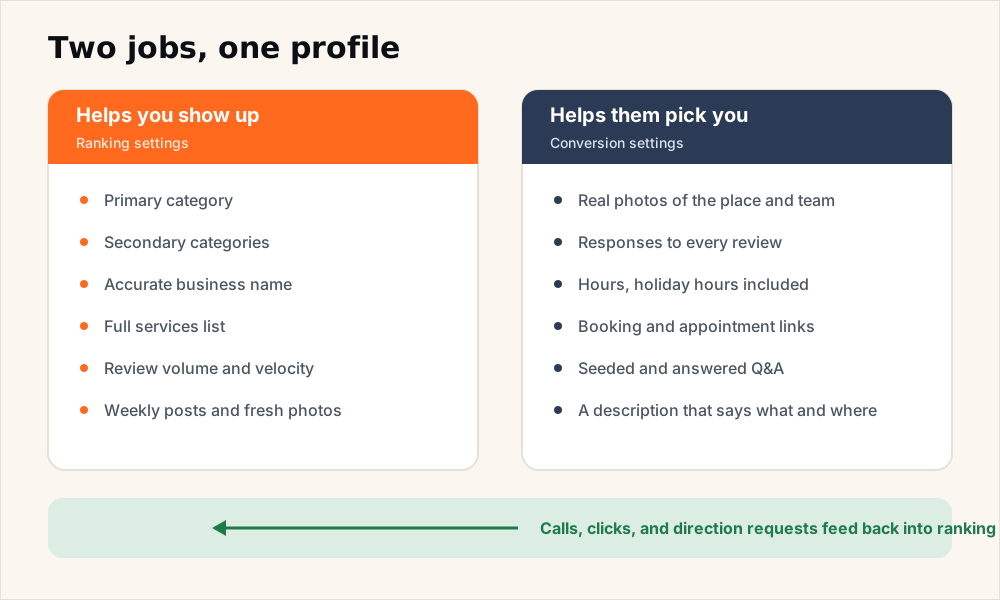
The split is not clean, and that is the point. When more of the people who see your listing call, click, or request directions, Google reads that engagement as evidence of prominence, and the conversion settings start paying ranking rent. A profile with honest hours, real photos, and answered questions does not just convert better. It ranks better because it converts better.
There is also a third reader now: AI assistants. When a prospect asks ChatGPT or Gemini for a recommendation nearby, the engines lean on the same profile data, reviews, and consistency signals this checklist builds. We cover that channel in AI visibility for local business.
How fast Google Business Profile optimization pays off
Relevance fixes move quickly. A corrected primary category or a completed services list can shift which queries you appear for within days. Prominence compounds slowly: reviews, photos, and weekly activity typically need 60 to 90 days of consistency before the map pack reflects them, with gains continuing after that.
Measure as you go. Profile interactions in the GBP dashboard tell you about clicks and calls, and a periodic rank check tells you about position. If you want the full measurement framework, our local SEO audit checklist covers every dimension worth tracking and how to read the rollup.
Run the checklist, then keep it alive
Google Business Profile optimization is front-loaded work with a long tail: 27 settings, one honest afternoon, then a weekly habit and a monthly half hour. The businesses that hold map pack positions are rarely the cleverest. They are the ones whose profiles are complete, accurate, active, and reviewed, quarter after quarter.
The fastest way to start is to find out which of the 27 settings you are missing. Audit your GBP for free to see how complete your Google listing is, your reviews, and where you appear in the map results, without creating an account. Fix the reds first, build the habits, and let the map pack catch up to the profile.
See where your own business stands.
We measure your local rankings, your listings, your website, and how AI assistants answer for your business. No signup required.
Or jump straight to pricing →